Showing posts with label Blogging Tips. Show all posts

Friday, 25 August 2017

Best Ways to Increase Your Blog/Website Traffic


Write Well and Write Often

Frequently updating your blog with useful content is the first step to building your blog's audience. The content you write is what will keep readers coming back for more. Make sure you have something meaningful to say to them and say it often to maintain their interest and keep them loyal.
Furthermore, post frequently to increase the number of chances you have for your blog's content to be noticed by search engines such as Google or Technorati.

Submit Your Blog to Search Engines

Get on the radar screen for the popular search engines such as Google and Yahoo! by submitting your blog's URL to them. Most search engines provide a 'Submit' link (or something similar) to notify the search engine of your new blog, so those search engines will crawl it and include your pages in their results.
It's important to understand that simply submitting your blog to search engines doesn't mean your pages will appear at the top of a Google search results screen, but at least your blog will be included and will have the chance of being picked up by a search engine.

Use and Update Your Blogroll

By adding links to sites you like in your blogroll, the owners of those blogs will find your blog and will be likely to add a reciprocal link in their blogrolls. It's an easy way to get the link to your blog in front of many readers on other blogs. The hope is that some of those readers will click on the link to your blog on the other blogs' blogrolls and find your content interesting and enjoyable turning them into loyal readers.

Harness the Power of Comments

Commenting is a simple and essential tool to increase your blog's traffic. First, respond to comments left on your blog to show your readers that you value their opinions and draw them into a two-way conversation. This will increase reader loyalty.
Second, leave comments on other blogs to drive new traffic. Make sure you leave your blog's URL in your comment, so you create a link back to your own blog. Many people will read the comments left on a blog post. If they read a particularly interesting comment, they are highly likely to click on the link to visit the commenter's website. It's important to make sure you leave meaningful comments that are likely to invite people to click on your link to read more.

Syndicate Your Blog's Content with an RSS Feed

Setting up an RSS feed button on your blog makes it easy for your loyal readers to not just read your blog but also know when you publish new content.

Use Links and Trackbacks

Links are one of the most powerful parts of your blog. Not only are links noticed by search engines, but they also act as a tap on the shoulder to other bloggers who can easily identify who is linking to their sites. Linking helps to get you noticed by other bloggers who are likely to investigate the sites that are linking to them. This may lead them to become new readers of your blog or to add links to your blog from theirs.
You can take links to other blogs a step further by leaving a trackback on the other blog to let them know you've linked to them. Blogs that allow trackbacks will include a link back to your blog in the comments section of the post that you originally linked to. People do click on trackback links!

Tag Your Posts

It takes a few extra seconds to add tags to each of your blog posts, but it's worth the time in terms of the additional traffic tags can drive to your blog. Tags (like links) are easily noticed by search engines. They're also key to helping readers find your blog when they perform searches on popular blog search engines such as Technorati.

Submit Your Posts to Social Bookmarking Sites

Taking the time to submit your best posts to social bookmarking sites such as Digg, StumbleUpon, Reddit and more can be a simple way to quickly boost traffic to your blog.

Remember Search Engine Optimization

When you write your blog posts and pages, remember to optimize your pages for search engines to find them. Include relevant keywords and links but don't overload your posts with too many relevant keywords or completely irrelevant keywords. Doing so can be considered spamming and could have negative results such as your blog being removed from Google's search entirely.

Don't Forget Images

Images don't just make your blog look pretty, they also help people find you in search engine listings. People often use the image search options offered by Google, Yahoo! and other search engines, and naming your images with search engine optimization in mind can easily boost your traffic.

Consider Guest Blogging

Guest blogging can be done when you write a guest post on another blogger's blog or when another blogger writes a guest post on your blog. Both methods are likely to increase traffic to your blog will be exposed to the other blogger's audience. Many of the other blogger's readers will visit your blog to see what you have to say.

Join Forums, Web Rings or Online Groups

Find online forums, web rings, groups or social networking sites such as Facebook and LinkedIn where you can share ideas and ask questions of like-minded individuals. Add a link to your blog in your signature line or profile, so each time you post on a forum or participate in another online network, you're indirectly promoting your blog. Chances are many people will click on that link to learn more about you.

Promote Outside Your Blog

Promoting your blog shouldn't stop when you step outside the blogosphere. Add your blog's URL to your email signature and business cards. Talk about it in offline conversations. It's important to get your name and your blog's URL noticed offline, too.

Nominate Yourself and Other Blogs for Blog Awards

There are a number of blog awards given out throughout the year. Nominating yourself and other blogs and bloggers can draw attention to your blog and drive traffic to it.

Don't Be Shy

The most important part of the blogosphere is its community and much of your success as a blogger will be tied to your willingness to network with that community. Don't be afraid to ask questions, join conversations or just say hi and introduce yourself. Don't sit back and hope the online world will find you. Speak out and get yourself noticed. Let the blogosphere know you've arrived and you have something to say.
     Have something to Add or Correct? The Comment Box is below....
Share:

Monday, 3 July 2017

20 Never to Miss Recommendations for Your Blog.

Here today, we have been receiving much of emails asking for advice about starting a blog, about how to blog, about blog topics, and about creating meaningful content. These are the answers and recommendations we tend to give.


  1. Find Your Niche. You needn’t have a niche, but it helps. When learning how to be a blogger, it’s important to ask yourself what you’re passionate about. Running? Cooking? Being a parent? Have you found your passion? If so, whatever it is, write about that. If not, then you must first find your passion. (Note: We generally recommend that people don’t start a blog about minimalism or the paleo diet or any other heavily saturated topic. But what we really mean when we say this is: don’t create a blog about something unless you have a unique perspective. If you’ve embraced simple living and have a unique perspective, then by all means have at it. Enjoy yourself.)
  2. Define Your Ideal Readers. Once you’ve found your niche, you need to know who will be reading your blog. For example, we blog about living intentionally. Thus, our ideal readers are people who are interested in exploring minimalism so they can clear the path toward more meaningful lives. If you want to write about your newborn baby growing up, that’s wonderful: your ideal readers are probably your friends and family. If you want to write about restoring classic cars, that’s cool, too. Tailor your writing to your readers (whether it’s your family or local community or whoever else will read your blog).
  3. Add Value. Your blog must add value to its readers’ lives. This is the only way you will get Great Quality Readers to your site (and keep them coming back). Adding value is the only way to get someone’s long-term buy-in. We both learned this after a decade of leading and managing people in the corporate world.
  4. Be Original. Yes, there are other blogs out there about the same thing you want to write about. Question: So why is your blog different? Answer: Because of you. You are what makes your blog different. It’s about your perspective, your creativity, the value that you add.
  5. Be Interesting. Write epic, awesome content. Especially if you want people to share it with others.
  6. Be Yourself. Part of being interesting is telling your story. Every person is unique, and your story is an important one. The important part of storytelling, however, is removing the superfluous details that make the story uninteresting. A great storyteller removes 99% of what really happens—the absorptive details—and leaves the interesting 1% for the reader.
  7. Be Honest. Your blog needs to be authentic—it needs to feel real—if you want people to read it. You can be your blog, or your blog can be you. That is, do you really embody the stuff you write about? If not, people will see through you. “Be the change you want to see in the world,” is the famous Gandhi quote. Perhaps bloggers should build the blog they want to write for the world.
  8. Transparency. Being transparent is different from being honest. You needn’t share every detail about your life just for the sake of being honest. Always be honest, and be transparent when it adds value to what you’re writing. (You won’t ever see pictures of us using the restroom on our site, because that’s just not relevant.)
  9. Time. Once you’ve learned how to start a blog, you’ll learn that blogging takes a lot of time, especially if you’re as neurotic as we are (we spent over 10 hours testing the fonts on this site). And see those black Twitter and Facebook icons in the header? We spent hours on those, deciding what was right for us). That said, once you have your design set up, don’t tweak it too much. Instead, spend the time on your writing.
  10. Vision. The reason our site design looks good is because we have a great host, we have a great theme, and most important, we had a vision of how we wanted our blog to look. Once we had the vision, we worked hard to make that vision a reality. (Note: neither of us had any design experience prior to starting a blog.) It’s hard to create a beautiful blog if you don’t know what you want it to look like.
  11. Find Your Voice. Over time, good writers discover their voice and their writing tends to develop a certain aesthetic, one that is appealing to their readers. Finding your voice makes your writing feel more alive, more real, more urgent.
  12. We Instead of You. Use the the first-person plural when possible. Statements of we and our are more powerful than than you and your, especially when talking about negative behaviors or tendencies. The first person comes off as far less accusatory. Think of it this way: we’re writing peer-to-peer—we are not gods.
  13. When to Post. Question: When is the best day and time to publish a blog post? Answer: It doesn’t really matter. We don’t adhere to a particular schedule. Some weeks we post one essay; sometimes we post three. Yes, it is important to write consistently, but you needn’t get too bogged down in the details.
  14. Social Media. Yes, we recommend using Twitter, Facebook, and Instagram to help connect with your audience and other bloggers, but don’t get too caught up in it. Focus on the writing first, social media thereafter.
  15. Ignore Negative Criticism and Stupidity. Sure, we get a lot of negative comments and stupid questions from ignorant people who aren’t really our readers (e.g., negative comments like “You’re not real minimalists” and stupid questions like “Are you guys gay?”). We call these people seagulls: they fly in, crap on your site, and fly away. But we pay them no mind, because we didn’t start our blog for them. Delete their comment and move on.
  16. Research. Spend time researching what you’re writing about. The reason we are able to use so many helpful, relevant links in our essays is because we put in the time to research our topics.
  17. Keep It Simple. This is where minimalism can be applied to starting any blog, irrespective of its genre. No need to place superfluous advertisements or widgets all over your site. Stick to the basics and remove anything you don’t need. Remove anything that doesn’t add value.
  18. Picture. Put a picture of yourself on your blog. People identify with other people. If two goofy guys from Ohio aren’t too afraid to put their pictures on their site, then you have nothing to worry about.
  19. Comments. If you’re going to have comments on your site, then read The Five Words That Kill Your Blog by Scott Stratten.
  20. Live Your Life. You’re blogging about your life (or about certain aspects of your life, at least), so you still need to live your life. There are things that we always put before writing: exercise, health, relationships, experiences, personal growth, contribution.
Share:

Good Tips to Start a Successful Blog.

How to Start a Blog: Step-by-Step Instructions

So you’re thinking about starting a blog, but you don’t have any idea where to start, right? Guess what—neither did we.
We were clueless. When we created this blog a few years ago, we had no idea how to start a blog or how to be a blogger. Heck, we could hardly spell HTML, let alone build a blog
.
But good news: it’s easier than you think. We’ve learned a ton of lessons during our ascent to 4 million readers. And now you can learn from our pain and suffering to circumvent much of the tedium involved in setting up a blog.
Here’s how we started our blog, step by step:
  1. Domain and Hosting. The first thing we did when starting our blog was go to Bluehost and register our domain. We didn’t even need to set up a WordPress page first, which is the platform we use, since Bluehost does all that for you. Bluehost’s basic price is $2.95 a month, which works for 99% of people (go to this link to receive a 50% discount off the monthly price and a free domain). Then, we did a simple, free, “one-click” install of WordPress through Bluehost. When we had questions we were able to chat with the “live chat” folks at Bluehost for free. They pointed us in the right direction and made starting our own blog super easy.
  2. Theme. A good theme gives you the look and feel you want for your blog, allowing you to make a blog that looks exactly how you want it to look. If you’re not a coder (we certainly weren’t), then a theme makes the design work a million times easier. Plus, once you purchase a theme, which are inexpensive for the time they save you, you own it for life. A theme has two halves: the framework (the bones) and the Child Theme (the beauty):
    • Framework. There are several WordPress theme frameworks on the market, but Genesis is without a doubt the best and most flexible choice. Genesis is the first half of your theme. Many themes merely handle the aesthetics of your new blog, but Genesis provides a necessary foundation for your Child Theme. Simply go to StudioPress and purchase the Genesis Framework.
    • Child Theme. After you get your Genesis Framework, you’ll want to find the right Child Theme (which is just a silly way to say “blog design”). The Minimalists uses the beautiful “tru” theme, which is available at BYLT, the Genesis Community Marketplace. Head on over to BYLT, browse their carefully curated collection of themes, and find the design that’s right for you.
  3. Modify Your Blog. Once we had our domain, hosting, WordPress, and theme, we spent a lot of time tweaking the theme to get the look and feel we wanted (i.e., making our vision a reality). Then we spent even more time tinkering with the theme and arguing about it and tweaking it some more. Once we had created our blog, we set up a free Feedburner account so people could subscribe to our site via email and RSS subscriptions. And then we established a free Google Analytics account to track our stats. Feedburner and Google Analytics were both easy to sign up for, and we still use both today.
  4. Plugins. We use only a few plugins on our site: “Google Analytics for WordPress” and really simple Facebook and Twitter share-button plugins (since human beings are intrinsically wired to share value, it’s important to make your posts easy to share with others). They take just a few seconds (literally a few seconds, it’s just a click of a button) to install once you’ve started your blog. And if you really want to play around with some cool plugins, check out WPBeginner’s Best WordPress Plugins.
  5. Write Compelling Content. Last, via WordPress, we started writing and uploading the content for our pages: About Page, Contact Page, Start Here Page, Books Page, Tour Page, Archives Page, etc. Next, we designed our logo using free images we found online and text from a regular word-processing program. Then we put a picture of ourselves in the header (this is important because people identify with people, not logos). Finally we started writing new blog posts and publishing them regularly (at least once a week), accompanied by free photos from Unsplash, Pexels, and the Library of Congress. And the rest is history.    MUST READ... CLICK HERE
Share:

Friday, 30 June 2017

How to Start a Good Loking Blog in 30minutes

BY KAREN EVANS :

So you want to start a blog. That’s great! Not only is blogging a great pastime, if done right, it can grow into a lucrative online business.
But to really succeed with blogging, you need to stand out. According to research by NM Incite, there are 6.7 million blogs in the world. That’s a whole lot of competitionIf you’ve already setup a blog, check out my resources page for tons of tips on how to stand out in the
marketplace of ideas.
If you’re new to blogging, on the other hand, it helps to get started off on the right foot. That’s why I’ve put this guide together for you, to walk you through the process to setup your blog in 5 easy steps.

Here’s how to start a blog:

  1. Choose a blogging platform.
  2. Register a domain name and hosting.
  3. Design your blog.
  4. Add content.
  5. Get traffic.
The goal of this page is to help you get started the right way. From years of coaching and helping people with their blogs, I’ve found that many people make mistakes when starting a blog, sometimes resulting in them abandoning the project altogether. We don’t want that to happen.
So I want you to take the time to thoroughly read this post. It’s about 4000 words long, so get comfy and set aside some time; I’m going to walk you through the entire process of setting up your self-hosted blog, so you ‘get it right the first time’.
Ready to create your blog today? Alright, let’s get right into it.

Step 1: Choose the right blogging platform (WordPress)


Before you can even start worrying about how your blog will look like, you’ll need to choose your blogging platform. WordPress, Tumblr and blogger market share
There’s a lot to choose from. You are able to create a blog with many different blogging platforms, such as WordPress, Tumblr, Blogger and more…
However, given that there are over 72 million active users using WordPress today, it’s clear which platform is the boss. Even my own blogs and sites are built with WordPress blogging platform. Here’s why:
  • It’s FREE for everyone to use (including themes, layouts and add-ons that many other blogging platforms don’t provide).
  • It’s super easy to set up.
  • It’s secure; WordPress is always updating their software and keeping everything sound and secure, so there’s rarely a worry of having your blog come under hacking attacks. No wonder Facebook, NASA and even university blogs are using WordPress.
  • It’s HIGHLY customizable. There are hundreds of free themes and plugins that add more functionality to your blog, from contact and subscribe boxes to plugins that improve blog performance and more.
While the other blogging platforms are generally all pretty OK, nothing in my opinion has ever come close to matching the freedom and customization options that WordPress offers. So without a doubt, go with WordPress. Especially when you are just starting out.

Why you shouldn’t create a blog on a free blogging platform

Without a doubt, you need to self-host your WordPress blog.
Think about it – what famous, successful blogger you know is using a free blogging website like “nollyrexblog.freeblogs.com” instead of their own domain name like “Nollyrexblog.com.ng”, for example?
It’s not just that – free blogging platforms have other problems too – including…
  • You don’t control your content – the blogging platform does. They could shut you down any time, and for any reason. Don’t believe me? Read this.
  • The web address of your blog will be long and hard to remember (like yourfreeblog.blogspot.com) instead of a catchy, branded address you choose.
  • You’re not allowed to advertise on most free blogging platforms, making it much harder to ever make money from blogging.
All of these limitations apply to the WordPress.COM blogs. What you really want is to self-host a WordPress blog – it’s the same software without all the limitations!
If I were you, I’d start with a self-hosted blog on my own domain from day one. Setting up a blog like this is WAY easier and less expensive than you think.

Finding a domain name and web hosting provider

Now to exciting part! To set up a self-hosted blog on your own domain name, you’ll need two things:
Domain name – This will be your personal blog address where people find you over and over again. For example Google’s Domain is www.Google.com. Your new blog domain name will be www.YourBlogName.com, except you’ll choose what’s going to be behind YourNewBlog. The cost of a domain name is usually $10/year, but if you follow this guide all the way, I’ll show you how to get one for much cheaper.
Web hosting – This will be the home of your blog address and content that’s on the blog. Without web hosting, you’ll be unable to use your domain. Think of it as a computer hard drive that stores all your content on your blog (images, blog posts and so on). The cost of web hosting is usually somewhere between $2-5 per month.
It’s less than an XL coffee at Starbucks, so it won’t break the bank. But it’s an important investment to your blog success.

Where should I get my domain name and hosting?

When it comes to hosting, there are only two things that matter.
  • Page load speed – The average amount of time (in seconds) it takes your blog to load.
  • Uptime – 99.9% isn’t enough (it’s 42 minutes of downtime per month). You should be aiming for 100%.
There are hundreds of different web hosting providers. They all offer you a similar service (domain + hosting) with a similar price, but since I’ve dealt with and monitored many famous and recommended web hosting companies like Bluehost, iPage, Godaddy,Whogohost etc…
I now only use and recommend www.HostGator.com for domain names and web hosting.
Why? Nothing has ever come close to HostGator in terms of blog load speed and uptime (see below):
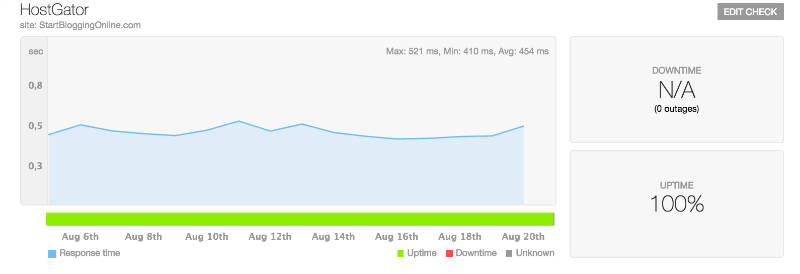
My blog hosting performance
HostGator has great performance, they are easy to use and it’s probably the best pick for beginners.
However, you can always go with another web hosting as long as it’s fast, reliable and offers unlimited storage & bandwidth. This helps you to avoid problems later on.

Step 2: Set up a Blog on your own domain name (self-hosted WordPress)


If you don’t have a hosting or a domain name yet – don’t worry. I’ll be showing this in a minute…
At the end of this step (2), you will have a fully working self-hosted WordPress blog on your own domain name! Sounds promising, huh?
If for some odd reason you don’t want to use HostGator, you can always choose another hosting provider. I can’t promise they’ll be that good, but the registration and the set up process should be some what similar. Some hosting companies do not have one click install for WordPress. If that’s the case, see this guide for installing WordPress manually (not recommended for beginners, though).

1. Go to www.HostGator.com and then click “Start Your WordPress Blog”.

Remember: Since I’m using HostGator by myself too, I’ve negotiated a discount for people who use this guide (72% off). This discount should be applied automatically. Enjoy 🙂
Hostgator landing page

2. Pick a Domain name for your blog

Already have a domain name?
Just write it in the right box (I already own this domain) and keep moving to the next step by scrolling down a bit.
How do I choose a good domain name?
Choosing a bad domain name is one of the most common mistakes I see bloggers make. Be sure you choose a domain name that is…
1. Easy to Remember – Don’t choose a nonsense name, something tough to spell, or a long name full of dashes. “www.best-tech-gadgets-in-the-world.com” won’t ever stick in someone’s head, but something like “www.socialgeeks.com” rolls off the tongue.
2. Unique and Descriptive – You want a name that reflects who you are and what you care about. Be creative and build an identity you’re excited about!
3. Trustworthy – Domain extensions like “.com”, “.org” or “.net” are the most popular, with “.com” being the one most people think of first. Try to avoid crazy extensions like “.rocks” or “.biz”, as these are less commonly used, tougher to remember and not as trusted.
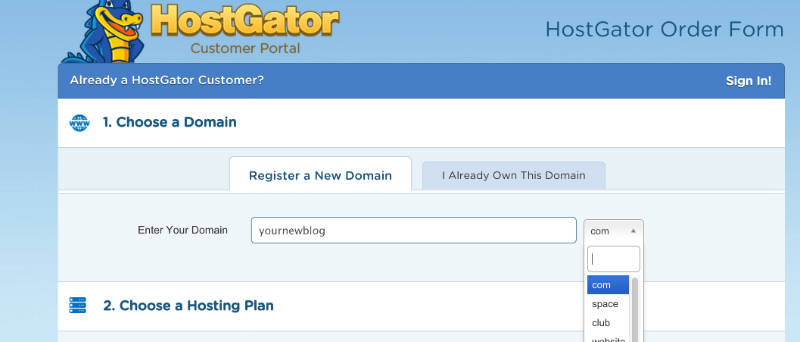
Type the domain name you want to use in the box, then click “next”. If the name is available, you’ll be able to claim it. If it’s not available, choose another one.
Your_Blog_Domain
If the name you want isn’t available, HostGator will show you some alternatives that are similar – or you can punch in a new name and try again. I’d suggest you to use something that ends with .com, .net or .org

3. Choose your blog hosting plan

I recommend the “Hatchling” plan for now – you can always upgrade later if you decide you want more advanced features, but you get more than enough with the Hatchling.
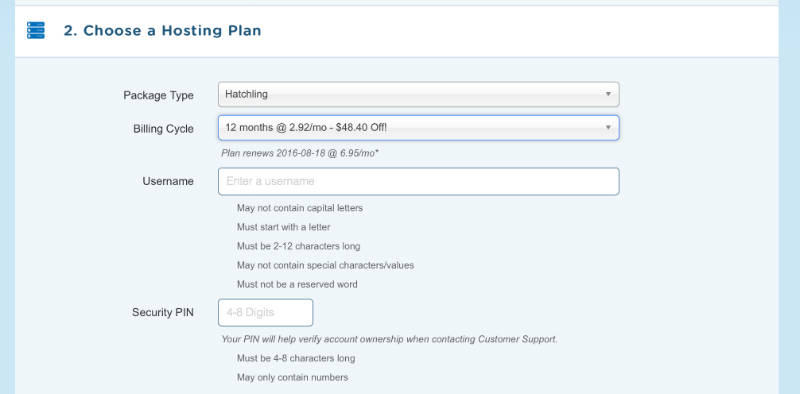
choose_blog_hosting_plan

4. Complete your registration

Once you’ve chosen Hatchling plan and found a name you like that’s available, you’ll need to register it by putting in your contact and billing information.
You’ll also have a chance to customize your package a bit. This is a chance to save some more money, so don’t skip it! Apply discount code “STARTBLOG”
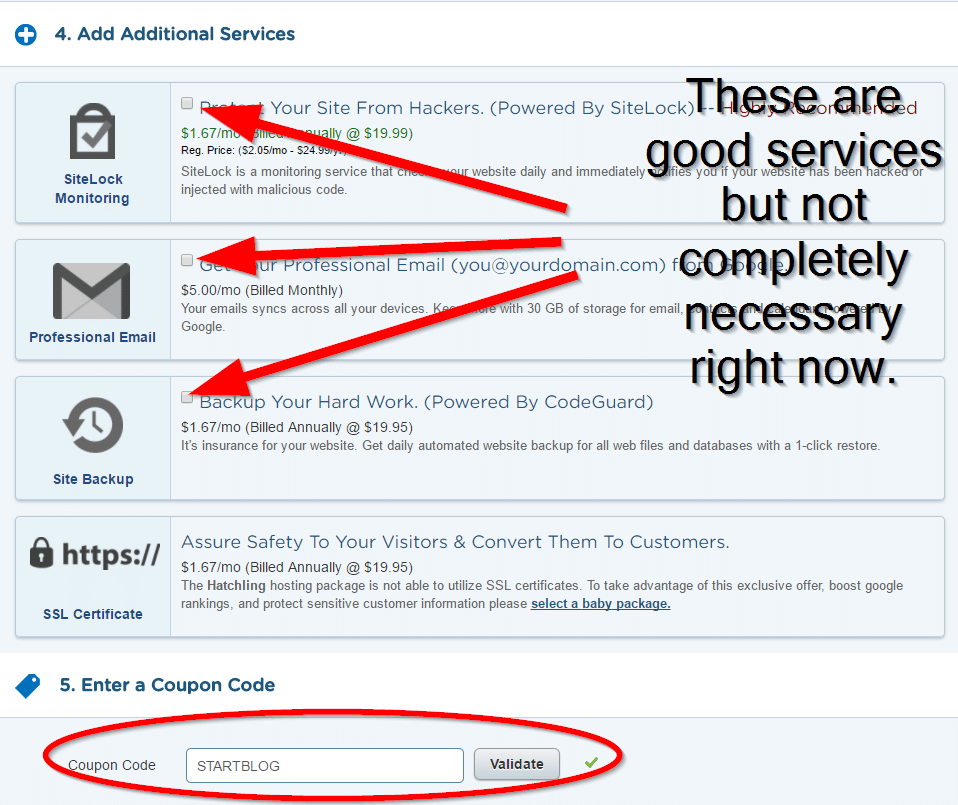
extra services for hg signup


I would take a look at each of these additional services to see if you want any of them.  I don’t believe they are necessary for you at this stage.

5. Log in to your new account and install WordPress blog

It may take a few minutes for HostGator to register your account, so be patient. You should get a confirmation email when your account is ready.
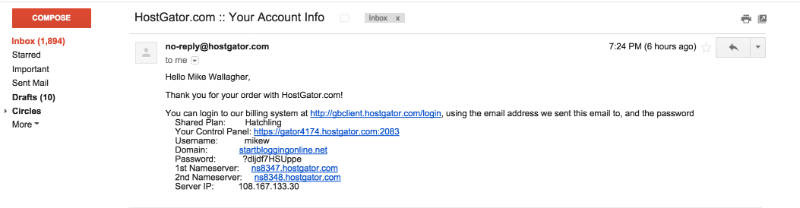
Once you’ve logged in to your control panel (all the information you need for that should be on your inbox) , it’s time to install WordPress. Thankfully, this takes just one click!
  • Log-in to your Hostgator control panel
  • At the top click “Get Started With WordPress Today”
  • If WordPress isn’t there for some reason, scroll down a little bit on the control panel and click on “Quick Install” under the Software & Services section. Look at the top of the page, in the left sidebar section for WordPress.
Once clicked, you’ll be automatically transferred to Mojomarketplace.com – don’t panic, this is just a site that helps HostGator install platforms (like WordPress).
You should immediately see a screen where you’re offered to “Install” or “Import” WordPress.
Click “Install” to get to the next step.
When you’re finished, “Install WordPress”. Once you’ve done that, you’ll see a loading bar at the top of your page that will eventually tell you that your WordPress blog has been installed and you’ll see your log-in credentials.
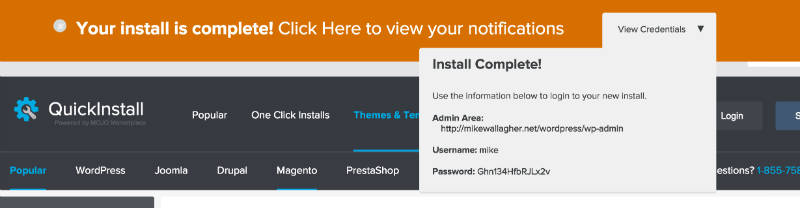
blog_install_finished

6. Log in in and check out your new blog

Once the installation completes, you’ll get an email that shares your login information, including an “Admin URL”. (In case you missed that notification bar)
To log in to your blog, click the admin URL. If you forget this URL, it’s simply www.yourblog.com/wp-admin (where “yourblog” is your domain name).
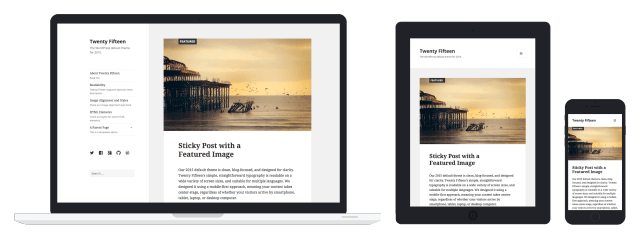
New Blog Homepage (1-6 steps)
Congratulations – you now know how to make a blog using WordPress. You’ve installed WordPress and set up your blog, all on your own! As you can see, it was really easy and straightforward.

Step 3: Designing your blog


In this section, I’ll show you some WordPress blog basics, including:
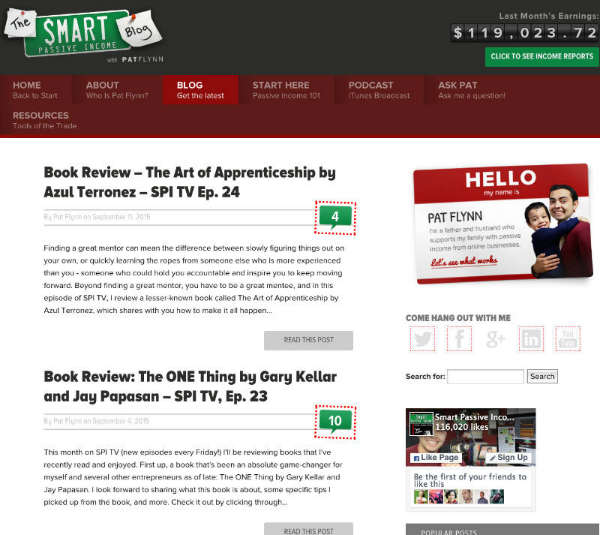
WordPress blog
Sample of a customized WordPress blog (SmartPassiveIncome.com)
  • Changing your blog’s design
  • Installing new plugins/features
  • Making your blog search engine friendly
If you’ve set up your blog, you’re now ready to start using WordPress and customizing your blog. I promise – it’ll be pretty easy and fun at the same time.
Remember: You can log in to your blog by going to www.yourblog.com/wp-admin/ and using the credentials you set up with HostGator or any other hosting company you used.

Changing Your Blog’s Design (Themes & Layouts)

WordPress blogging platform uses design templates called “Themes” to figure out how your site should look. Changing your blog’s layout and design is as simple as installing a new theme.
There are over 2,000 professionally designed, fully-customizable and free themes to choose from – so you’ve got a lot of options. If you want to see premium themes and designs like the Genesis Framework, head over to Themeforest.net

Here’s how to find and install a theme you love:

When you log in for the first time, you’ll see a dashboard or admin panel that looks something like this:
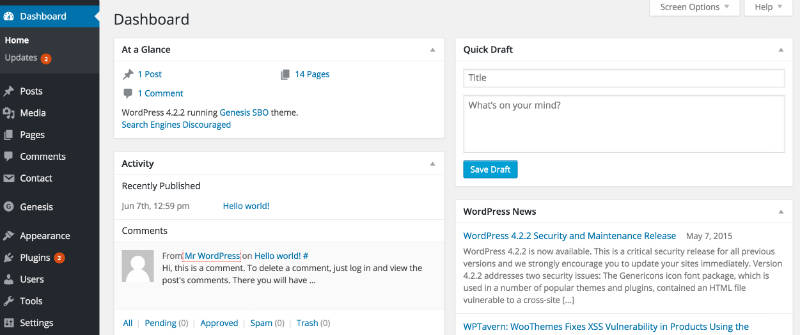
Your_WordPress_dashboard

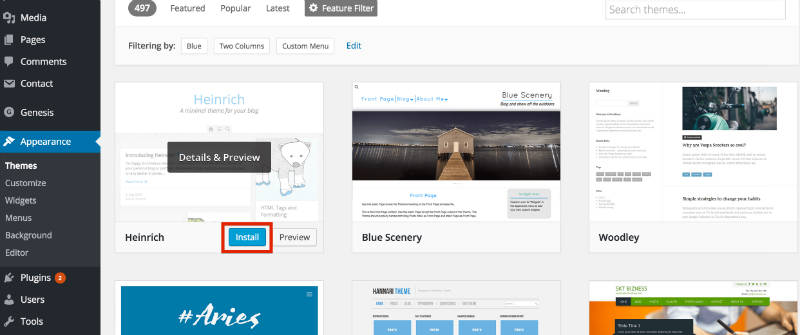
Mouse-over the “Appearance” tab in the WordPress sidebar, then click on “Themes”.
find_a_perfect_theme

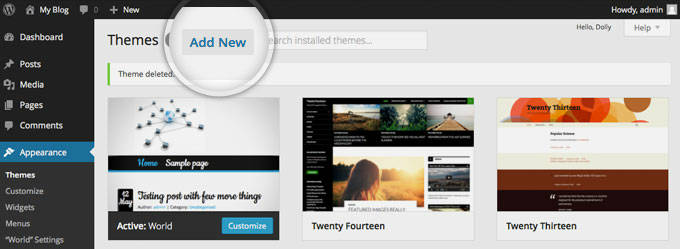
On the next screen, you’ll see several themes are already installed. If you don’t like those, click the “Add New” button at the top, or the great big “Add New” square to start searching for a theme.
add_new_theme
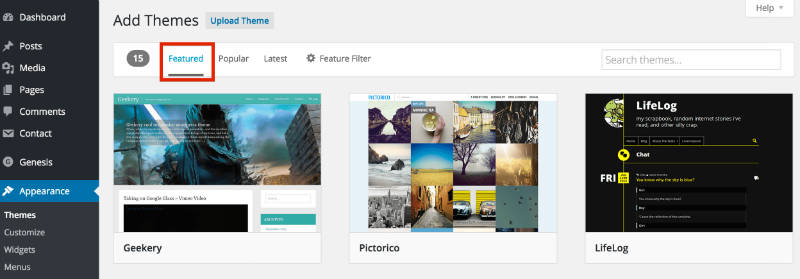
Now, you’ll see tabs where you’ll find featured, popular and brand new themes, as well as a “Feature Filter” and search bar.
featured_themes

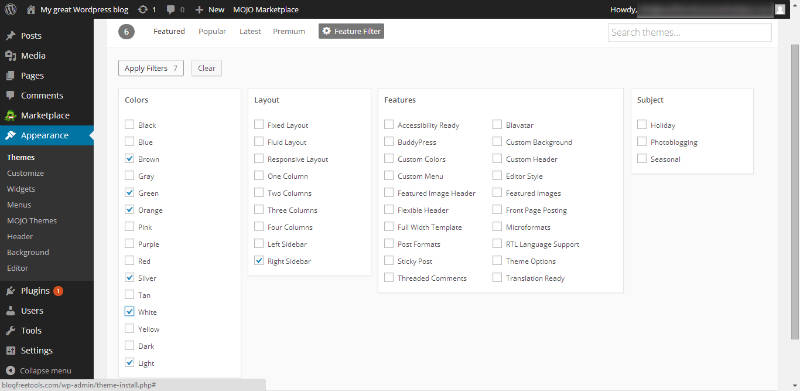
I really like the “Feature Filter” option, because you can choose themes in certain color schemes, select specific layouts and even choose themes with built-in advanced features.
Just choose the options you want, then click “Apply Filters” on the left hand side. If you’re finding this challenging, just search by keyword – there’s no wrong way!
apply_filters

When you’ve found a theme you like, click “Install”. You’re nearly done!
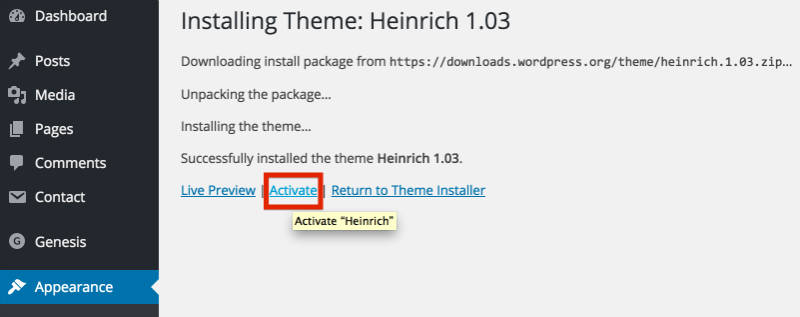
Once the theme has been installed, all that’s left to do is click “Activate” on the next screen:
activate_your_blog_theme

Configuring your blog to be search engine friendly

There are some things you’d need to do to make your blog more search engine friendly. Search engines do not like two things:
  1. Ugly and clumsy URL-shttp://yourblog.com/2012/04/topic-a/author-Karen/how-to-start-a-blog. A much better way is to use: http://yourblog.com/start-a-blog
See the difference? One is filled with irrelevant information and the another one is short, clean and neat.
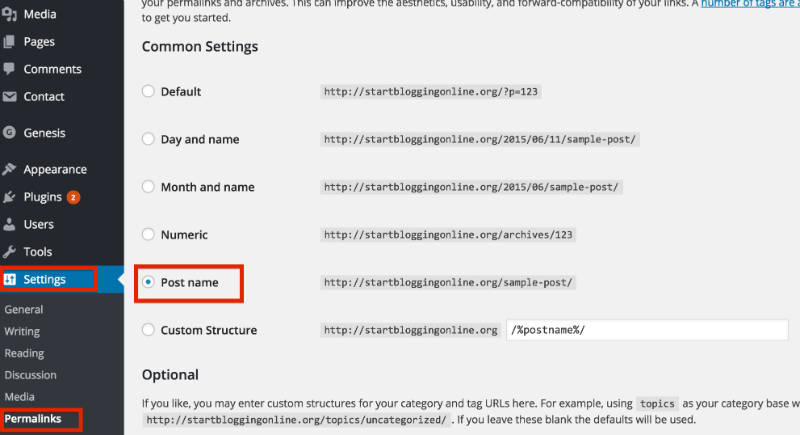
In order to change your links to a more cleaner, click on the “Settings” -> “Permalinks” and use the following settings:
permalinks

2. Spam comments – Unfortunately, lots of people want to leave automate spam comments on your blog. They do that for couple of reasons – to get people from your blog to their blog and to advertise their services/products.
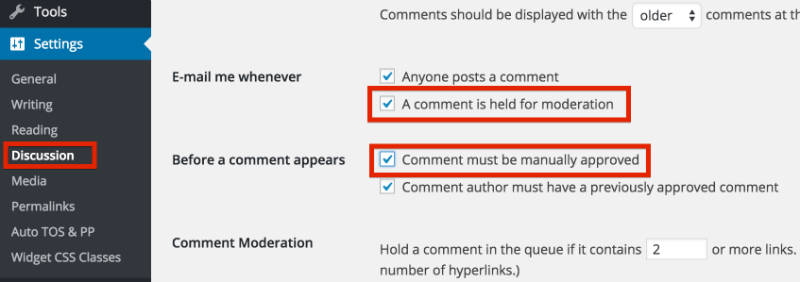
To avoid that, make sure you moderate your comments. Here’s how to do that: Go to “Settings” -> “Discussion” and tick those two options.
disable_comments


Step 4: Adding/Writing Blog Posts and Pages


By now you should have fully working WordPress blog on your own domain name. You should also have a custom blog theme that fits with your blog’s topic. Congratulations – you’ve done a LOT and I’m proud that you’ve managed to get so far.
In the LAST step, I’ll show you how to write your first blog post and share some tips for writing blog posts.
In this section, I’ll show you…
  • How to write a post inside WordPress
  • How to add images, links and format text
  • Some quick tips and tricks for writing great content

Using WordPress to Blog

Adding a New Post

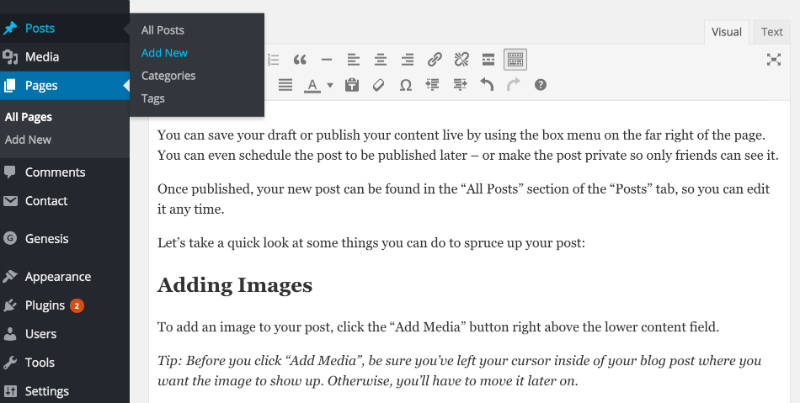
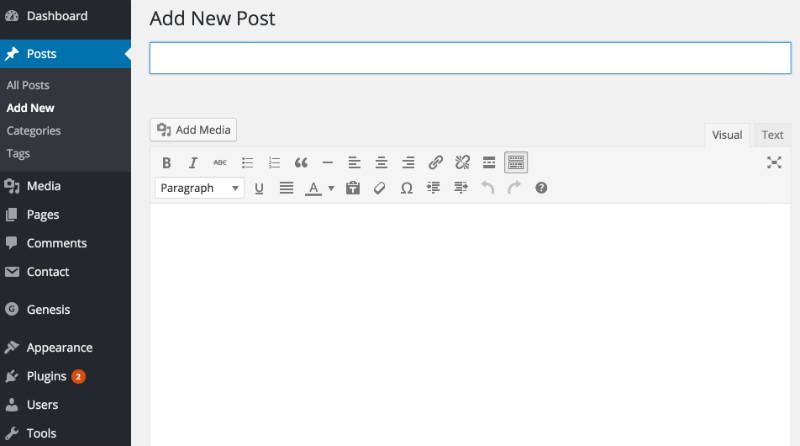
To add a new blog post, click the “Posts” section on the left hand side-menu, then click on “Add New”.
Adding_a_new_blog_post
On the next screen, you’ll see something like this:
Writing new blog post
You can add the title to your blog post in the top field, and your content goes in the big text box below the title.
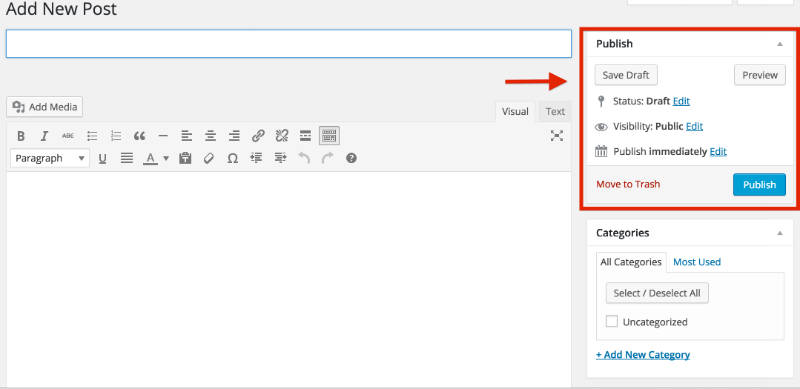
You can save your draft or publish your content live by using the box menu on the far right of the page. You can even schedule the post to be published later – or make the post private so only friends can see it.
BlogPost_status_visibility
Once published, your new post can be found in the “All Posts” section of the “Posts” tab, so you can edit it any time.
Let’s take a quick look at some things you can do to spruce up your post:

Adding Images

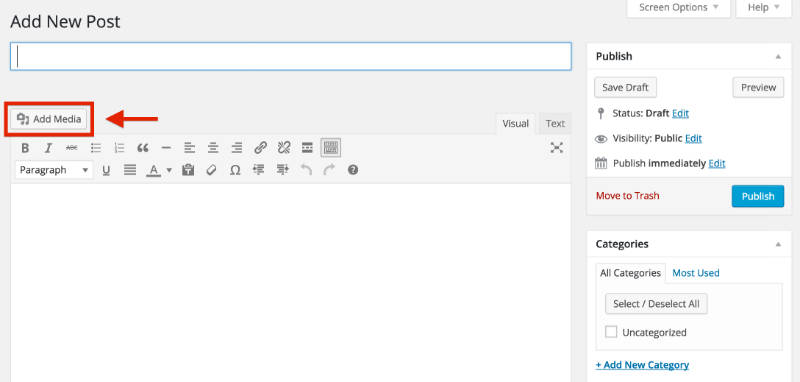
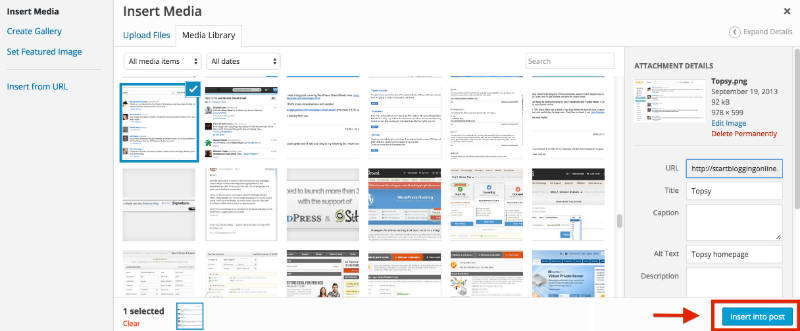
To add an image to your post, click the “Add Media” button right above the lower content field.
Tip: Before you click “Add Media”, be sure you’ve left your cursor inside of your blog post where you want the image to show up. Otherwise, you’ll have to move it later on.
Adding_media

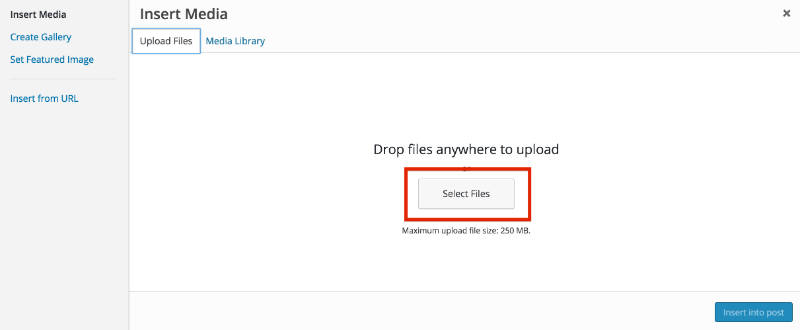
Next, click the “Upload Files” tab on the screen that pops up, then click “Select Files”.
adding_images_blog_post
Once you’ve found the file, double click it and WordPress will upload it automatically.
When the upload is finished, make sure the image you want is selected, then click the “Insert into post” button to add the image to the post you’re writing.
insert_image_into_blogpost

Adding a Link

Linking out to other websites is a great way to build relationships and share interesting content.
To add a link, click on the icon in the toolbar that looks a bit like a chain link.

instert_a_blog_link
On the pop-up, you’ll need to enter a few important bits of information.
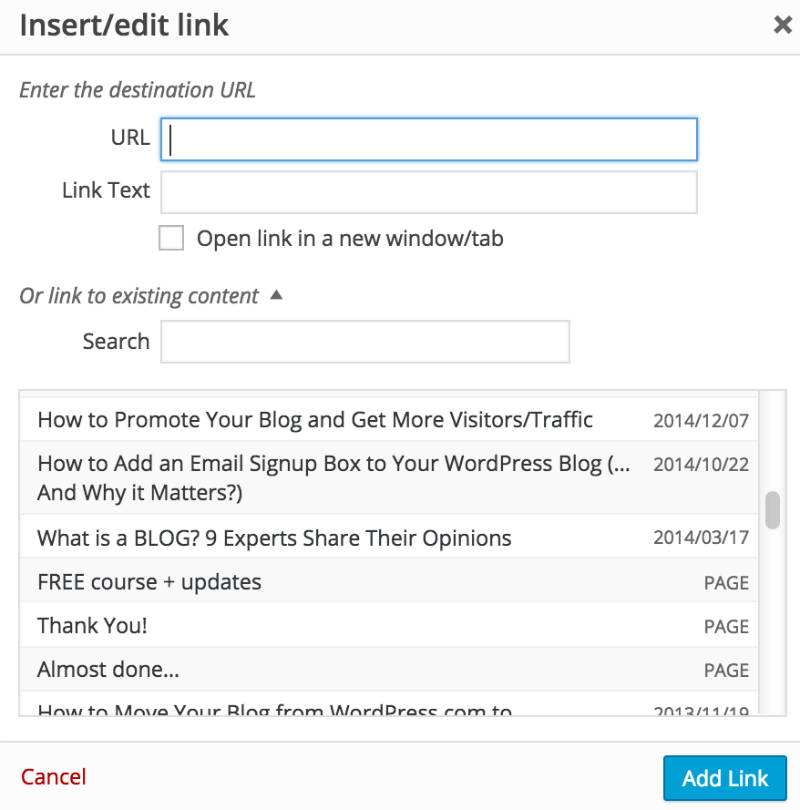
Adding_link2
  • URL is the web address of the link you want to share. Make sure you include “http://” before the “www.” address, or your link will be broken.
  • “Link Text” is the text you want people to click on to get to your link. It might be “Click here”, or anything you choose.
  • “Open link in a new window/tab” – it’s a smart idea to check this box. Otherwise, when someone clicks your link, they’ll leave your blog.
  • If you want to link to an existing page, you can use the “Search” section to find a post or page you’ve already created and click it to add a link.
Finally, click “Add Link”, and your link will be added where you left your cursor in the post you were writing.

Adding Headers & Editing Text

It’s a good idea to use headers and bolding to make your content easier to read and scan.

Adding Headings

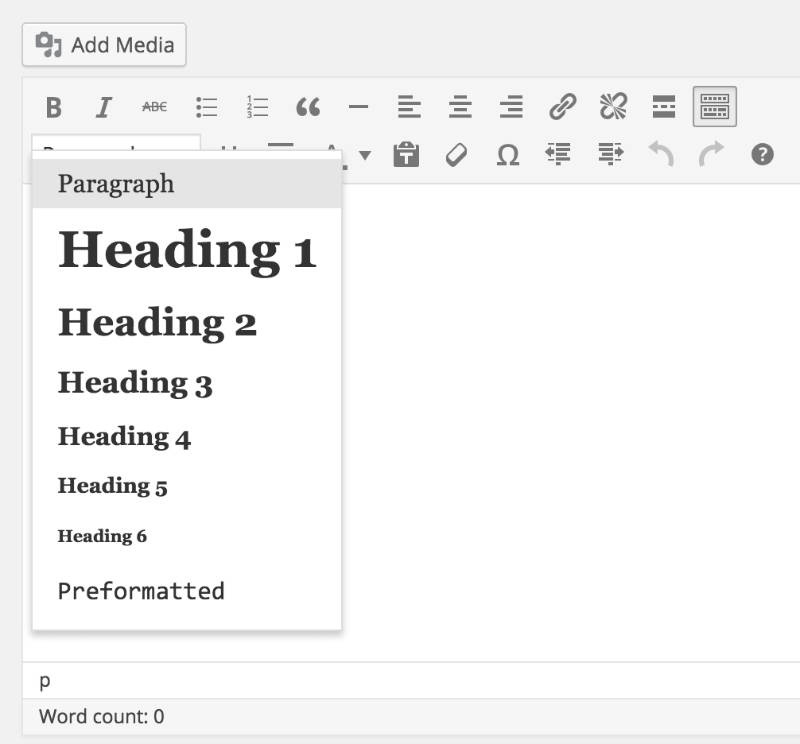
To add a heading, click on the drop-down menu on the bottom left of the toolbar.
Blog_Post_Headings
Try to only use “Heading 1” once within your page (usually at the top), and use “Heading 2” or “Heading 3” for other sections in the copy, as this is better for search engines.
Tip: You can also highlight the text you want to change in your blog post, THEN click on the dropdown menu and select the format you want the text to be in.

Editing Fonts

You can also bold, italicize, underline and even change the colour of your text in a click or two.

change_font
  • “B” is for bolding
  • “I” is for italics
  • U” is to underline your text
  • A” will open a dropdown menu where you can select font color
As you can see, this is all pretty simple for someone who has worked with Microsoft Word.

Step 5: Start Growing Your Blog


Now that you have set up your blog and know the basics, it’s time to make your blog successful. Many
beginners struggle at that point, thus I’ve put together a handful of guides to get you going easier.
If I were you, I’d suggest you to go and check my resource page . It’s nothing too much, but enough to get you going and a bit more.

Things to do after you’ve created your blog:

The first thing I’d do is create a proper About Me and Contact page.
  • Creating a perfect about me page (This is usually the most visited page on your blog)
  • Adding a Contact Page/Form on your blog (So that your readers could contact you)

FAQ (Frequently Asked Questions)

Q: What blog site should I use?
A: WordPress is the most popular platform, powering over 25% of the web! Best of all: it’s free.
Q: What should I write about? What blog should I start?
A: Recipe blogs, fitness blogs, and business blogs are some of the most popular. Here’s how to pick a blog topic people will really want to read.
Q: How do bloggers make money?
A: There are a number of ways including advertising and digital products, but some people just do it for fun. Check out my article How To Make Money From Your Blog.
Q: How Do I Pick A Domain Name?
A: I would suggest using your real name (because you can change it later).
Q: Are blogs social media?
A: Blogs can be considered social media, because they have comments and social interactions. However from a technical standpoint, analytics software does not count blog traffic as social media traffic.
Q: Is blogging dead?
A: No way! Over 409 million people read blog posts every month. You’re reading one right now!
Q: What’s the difference between a blog and a website?
A: Blogs are frequently updated with articles while a website is generally “set it and forget it”. Blogs might have less features than a website and just focus on creating really good content. For this reason a blog is more socially active, with shares and comments.
Share:

Best Ways to Monetize Your Blog/Websites

Now that you have your blog set up and traffic is coming your way, you’re ready to start monetizing your blog.
You must have seen or heard about people who make a lot of money from blogs. Some people aren’t even afraid to show it off to their readers. Here are a couple of folks who do extremely well with blogging:
  1. Pat Flynn from SmartPassiveIncome.com makes around $80,000 per month (he started his blog 5-6 years ago, though).
  2. Lindsay from PinchOfYum.com makes around $20,000 per month (she started her blog in 2010).
  3. Regina from ByRegina.com makes around $7,000 per month.

Email marketing to your own list the best way to make money with your blog.

List building refers to adding new subscribers to your email list. You can entice readers to subscribe by offering a free gift exclusive to subscribers and, of course, by consistently producing great content that people want to come back to.
But how does this help you monetize? It keeps people in-the-know. When you launch your eCourse, start offering consulting services, or publish an eBook, your subscribers are going to be the first ones to care. So, if you want to see quick results after a launch, be sure you have an email list built up to gain access to a pool of interested individuals.
That’s not to mention that you can also monetize your email campaigns with banner ads and affiliate links, too. In some cases, you might even set up a separate paid subscription email list for exclusive tips and offers.
If you want to start gathering your visitors you will need a email service. I recommend Constant Contact. *Constant Contact has a 60 day free trial (no credit-card required). After that their pricing starts as low as $20/month but I was able to get you 20% off if you click here! I like their service because it isn’t expensive, they have excellent support, and a great autoresponder management system.

Here are six more excellent ways you can monetize your blog:

1) Affiliate Marketing

Affiliate marketing is a type of performance-based marketing. As the blogger, you include links to a product or service offered through another business’s affiliate program. If one of your visitors clicks on that link and purchases the good or service, you’ll receive a cut of the cost.
That’s how I monetize my blog here at Start Blogging Online.
If you choose to join an affiliate program, it’s always a good idea to:
  1. Only promote products relevant to your niche.
  2. Only promote products you’ve personally used and recommend.
  3. Include a disclaimer on your site as to not mislead your readers (like I do here).
So how do you get involved in affiliate marketing? You can start by joining a popular program such as:
But you don’t have to stick with just the big-name programs. Businesses can also set up their own programs for a single product or a small group of products, and you can become one of their affiliates. For instance, a fellow blogger might offer an affiliate program for eBooks or eCourses in your niche, which would be a great opportunity for you since it’s highly relevant to your readers.
How much can you make through affiliate links? Melissa Culbertson of Blog Clarity points out just two examples of a mommy blogger and decorative concrete blogger who make $20,000 and $32,000 per year respectively, and that’s with minimal visitors.

2) Google AdSense

Some people create a self-hosted blog solely for ads and Google AdSense is one of the most popular ad networks around. Simply put, you make money by displaying ads on your site. There are two ways to start earning cash from Google AdSense:
  1. Based on impressions: This depends on page views. For instance, for every 1,000 page views you get, you earn a set dollar amount.
  2. Based on clicks: Regardless of page views, if a visitor clicks on the ad from your site, you’ll earn a certain cut of the ad revenue. This can range anywhere from $0.01 to a couple of dollars depending on the ad.
AdSense is compatible with free Blogger blogs and self-hosted WordPress blogs, but keep in mind that it won’t work with a free WordPress blog (although you can monetize with WordAds if you have a custom domain).
googleadsense
How much can you make with AdSense? Well, that all depends on your traffic and how many people are willing to click on your ads. (Remember that you should never click on your own ads since Google can penalize you for it.) Pat Flynn of Smart Passive Income has reported earning upwards of $3,000 per month on AdSense revenue alone, but other bloggers like Spencer Haws of Niche Pursuits have reported earnings well over $10,000 per month.

3) Course and/or Services

If you’re already teaching your visitors through your blog, why not create an exclusive learning opportunity by building a paid online course? A common way to sell these courses is by setting up an 8-week course through automated email messages or releasing the full package all at once so students can work at their own pace. Just some examples of online courses include:
  • Audience Business Masterclass (from Firepole Marketing)
  • Article Writing Masterclass (by Carol Tice and Linda Formichelli)
  • Social Media Training for Serious Marketers (from Market Motive)
How much can you make selling eCourse memberships? Again, this all depends on how much you sell it for and how many people are willing to purchase the course. Gina Horkey of Horkey Handbook made over $1,000 in her first month after launching a freelance writing eCourse.
Like courses, you can also offer services. For example, many bloggers are also freelance writers, and they get paid to write blog content for other people. Other common services include speaking engagements and private coaching. Depending on your niche, you can get more specific. A wedding blogger, for instance, might offer wedding planning services.

4) Consulting

Consulting is another popular way to make money through your blog’s traffic. With these services, you charge a fee to give feedback to readers. For example, let’s say you blog about social media. You could charge $75 for a one-hour Skype session where you discuss your client’s social media strategy. Along with the Skype call, you might send a full written report via email on how to improve that strategy.
Let’s look at a few examples. Jim Connolly of Jim’s Marketing Blog sells two-hour-long “Pick My Brain” sessions for $319 a pop to discuss marketing tactics. Sophie Lizard of Be a Freelance Blogger sells one-on-one mentoring sessions for freelance bloggers in packages ranging from $197 to $497.

5) Paid Reviews and/or Banner-ads

If you’re generating a decent amount of traffic, you might be approached by a business looking to sponsor your site. There are usually two requests you get in these cases:
  1. Paid reviews or sponsorship posts
  2. Banner ads
Paid reviews are when the business sends you their product and pays you to write a review about it, but you are not obligated to write a positive review. Alternatively, some businesses will sponsor a specific post in exchange for a link back to their site. It is an ethical practice to disclose the sponsorship to your readers.
Banner ads are just what they sound like. They’re ads you place in “banner” style, usually in your sidebar. The business sponsoring the ad will often pay you monthly to keep the ad up on your site.

6) eBooks

Writing eBooks is a super popular way to start selling a unique product in your industry, and it’s ideal for pretty much any niche. With so many self-publishing opportunities available, too, it’s easy to get your book published and ready to sell with major retailers like Amazon or directly on your site.
How much money can you make? Darren Rowse of ProBlogger reports earning $72,000 in just one week after launching his eBook. If you’re not terribly well-known, you can still make a decent chunk of cash. Steve Gillman reports at The Penny Hoarder that he made about $2,000 from an eBook on ultralight backpacking that he wrote in just a few days.
Share:

10 Best Tips to Increase Your Adsense CPC.

If you are a Blogger and Adsense is your prime source of revenue, you can’t afford to ignore the importance of Adsense optimization. When we talk about Adsense optimization, there are many things, but the main target is to get high eCPM and get more Cost per click. Else, despite of good AdSense CTR, you might not be making good money. This is something familiar about the non-English blog. If you fall in the category of those AdSense publishers, who are getting huge traffic but Adsense earning is still low, it’s time to understand
points which are mentioned below, and this will surely help to increase Adsense CPC and overall revenue.

What is AdSense CPC:

Let’s start with answering basic question first and then we will move to some working tips to increase AdSense CPC. CPC stands for Cost per click, in short money which you make/click is what CPC. Now, you might have noticed Adsense publisher talking more about CTR and less about CPC. If you are really serious about your Adsense revenue, you should, work more on CPC than CTR. Getting thousands impression on your ad won’t be of much help but a blog with good CPC with decent CTR can create a huge difference. CPC has nothing to do directly with your traffic, if you would realize and noticed micro-niche blogs, you might have realized despite of less traffic such sites make more money from Adsense. Reason is simple and that is eCPM for such blogs are so high that you get paid really well for CPC and then there are other factors like Ad competition, Keywords and many more.

Factors that Affect Adsense CPC :

Niche
First thing first, choosing a right niche for your blog or website is of utmost important. Cost Per Click or CPC of an ad directly depends upon the topic on which you’re writing your blog.Well! Let me clarify one thing here that you’re going to choose niche however there are niches that can pay you high CPC. Yes! Here is the list of niches that can give you high return, I have arranged them in decreasing order of CPC.
  • Domains – Blogs on Internet Domains Like GoDaddy, Namecheap etc. It pays highest CPC.
  • Gadgets – Tech Gadgets like Apple products
  • Google – Google Products
  • Microsoft – MS Office
  • Banking
  • Automobile
  • Health
  • Real Estate
  • Home Loans
  • Jobs
  • Dating & Romance – It pays lowest CPC.
Content
Second thing is the content, you must write content that should answer readers query. So before writing blogs try to find what your readers are searching on the Internet and then try to present them with solutions.
 Remember you should always directly engage with your readers. Your content must be tailored according to your niche so that more and more readers can read your blogs. Hence good content will certainly ensure higher Adsense CPC rates. Moreover, Good content is what search engine loves, hence more click and more revenue if your ad is highly targeted and your traffic is from the countries like U.S.A, U.K. When you do a Keyword research, make sure to use Approximate CPC column.


Allow block ads:
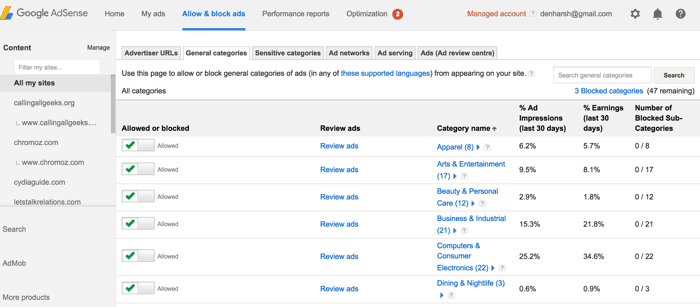
In Google Adsense you will find Allow block ads. You can go there and see yourself how much each ad category is paying you. This will show you different ads category that are showing on your website. If you find that any ad category is not paying much then feel free to block that category.
Block ads on AdSense
Try to block those categories which are completely irrelevant to the content or niche of your blog. Suppose blog is about Technology then block the ad categories for Dating, Politics, Religion etc. This will surely increase your AdSense CPC.

Platform
Your blogs are read from different platforms like desktop, laptop, mobile etc. Although CPC is generally not much affected by the platforms on which ads are shown but you should try your best to target as many as readers. You will get most of the readers from desktop and laptop devices.
If you are able to reach to hand-held or mobile readers than CPC may increase as ads shown on cellphones are of higher quality. If you are blogging on WordPress platform, you can use any of these plugins to make your blog mobile friendly, and you serve AdSense ads which are optimized for mobile screen size.


Country

One of the most important factor that can increase CPC is the country you are targeting. For example a click on an ad from USA can pay you up to $2 to $3 and click on same ad from India can end up paying only 20 to 30 cents.
Hence, always tailor your blog and its content to audiences in English-speaking countries. It will also increase Page Rank of your website. So always keep in mind the country you are targeting.

Text & Image Format
Perhaps I should have explained this suggestion in the beginning of the blog. Anyhow, you must know to choose right format for your ad. If you can place three ads on a page then choose two 336 X 280 ads and one 468 X 60 ad.
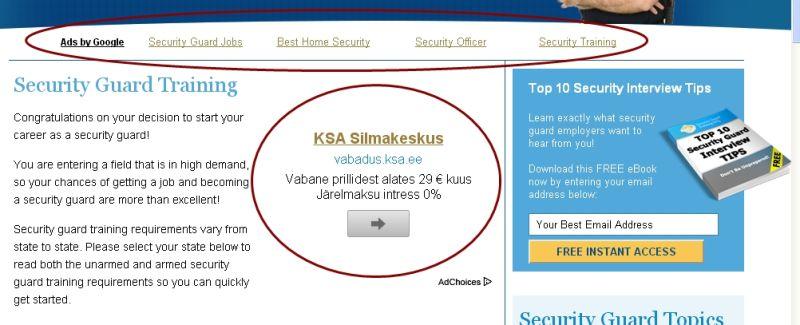
Then ad format must be text because text ads have higher CTR (click through rate). You can even try ad format for both text & image simultaneously as it gives you more CPC. Image ads are usually less preferred for both reasons less CTR and lower CPC. Though at times, depending upon the niche and blog type, image ads perform better in terms of higher CTR but CPC won’t be as good as text ads. Anyways, as I mentioned above it differs from niche type and most important ad placement.

Placement
Never neglect the placement of your ads on the web page as it is directly proportional to your Adsense revenue. So where to place ads for maximum CPC? Answer is simple. Place 2 ads inside your blog post and 1 outside the post.As far as placing inside goes then place one 336 X 280 rectangle ad on the top of the blog just below the title and place second 468 X 60 ad in between the blog post. Remaining one ad you can place on your right side that is outside your post.


Though it should be your choice and depending upon your reason of blogging. For example, if you are a professional blogger and dependent on Adsense, you should not miss a chance to optimize ad and use maximum possible ad units on a single page. Though if you are a hobby blogger or blogging on personal blog, your first target should be giving quality content and less ads, as readers hate advertisement which distract them from reading.

Let me tell you the maximum clicks and higher CPC will come from 2 ads which are inside the blog post especially on the top.

Keep Experimenting
Always keep trying something new. Experimenting can really pay you high dividends. You can try out for different niches, choose different ad placements and finally take as many as advice from Google Adsense center. Never bogged down into one style always try something new.

Conclusion
In conclusion I would only say if you follow and implement these 10 tips then you can surely increase your AdSense revenue from 30% to 40%. It is completely legal and genuine way to increase your earning in short time. You can also search for highest CPC AdSense Keywords and compile one-two posts around it.
What others are reading:

Do let me know what’s one trick which worked for you to increase Adsense CPC? Do you believe niche and traffic from certain countries creates a huge difference in Adsense earning?
Share:

Best 16 Top Tips from Blogging Experts for Beginners

These 16 bloggers shared one important tip each for blogging beginners. No doubt, even if you’re not a beginner these tips will probably prove to be useful.

blogging advice - dave_larson1. Get ideas from your audience

Create blog posts that answer the most interesting questions from people you engage with on social media
.
Dave Larson, founder of @tweetsmarter
This can be a great way to gather ideas of what topics people would most like to read about, which will help your blog grow! One of the best ways I’ve seen this in action is through blog comments or Tweets. In one example, here on FastCompany a lot of people requested a post that features more women entrepreneurs:
blogging advice - screenshot
Now, a few weeks later adding such an article where just women contributed and built great businesses was a big hit:

blogging advice - fastco screenshot

blogging advice - brian-clark2. Understand your audience

Understand your audience better than they understand themselves. It takes a lot of upfront research, and often means being a member of the very tribe you’re trying to lead – but it pays off.
Brian Clark, founder and CEO, Copyblogger
Understanding your audience better means you’ll have a better idea of what blog content will resonate with them, which is a good start when you get to writing blog posts.
A great technique for doing this is to simply ask your readers first on Twitter, Facebook or LinkedIn with an engaging quote. If people respond well to it, than this is probably a great topic to write about. An example for this comes from Andrew Chen who famously “tests” his blogpost ideas on Twitter first.
And so does Joel here at Buffer. Take this example from a recent Twitter post of his, where he simply tweeted one quote to see how well people liked a topic before he blogged about it:
blogging advice - tweet

blogging advice - Adii-Pienaar3. Write for yourself first

Write for yourself first & foremost. Ignore the fact that anyone else will read what you write; just focus on your thoughts, ideas, opinions and figure out how to put those into words. Write it and they will come.
Adii Pienaar, founder of PublicBeta
Adii’s experience in writing for himself firstly has made a difference to his blog in ways he didn’t expect:
Yes, since I’ve been writing for myself, I’ve found that I write more and I publish more often. I think though that the main reason for that is that I don’t decide whether to publishing something based on the traction / reception that the post will receive within my audience; instead if I want to publish something, I do so. For myself.

blogging advice - kristi-hines4. Build your email list

Start building your email list from day one. Even if you don’t plan on selling anything, having an email list allows you to promote your new content to your audience directly without worrying about search rankings, Facebook EdgeRank, or other online roadblocks in communications.
Kristi Hines, freelance writer and professional blogger
When you’re asking readers to sign up for your email list, you might want to try experimenting with different language. Willy Franzen found that his subscription rate jumped 254% higher when he changed his call-to-action from “subscribe by email” to “get jobs by email”:
blogging advice - subscription rate
Using this phrase more clearly tells Willy’s readers what they’re signing up for, which clearly worked well!

blogging advice - darren_rowse5. Love your existing readers

Love the readers you already have. A lot of bloggers get quite obsessed with finding new readers – to the point that they ignore the ones they already have. Yes – do try to find new readers but spend time each day showing your current readers that you value them too and you’ll find that they will help you grow your blog.
Darren Rowse, founder of ProBlogger
Focusing on your readers is a great way to get to know them better (see tip #2). I love the way Daniel Burstein describes blog readers’ expectations of you as a blogger:
A blog is really two things. One, simply a piece of technology, a platform. But, two, it is a promise in the minds of most readers, who expect that the blog should have actual content with some elements of value that is hyper-targeted to their needs. Much like with a newspaper. Readers don’t just look at a newspaper as newsprint that is delivered on their driveway every morning. They look at it as valuable information about their city, where they live, and the things that they do.

blogging advice - nate_kontny6. Focus on building an amazing call-to-action

I screwed up for years. I’d blog and blog. Some of my posts were doing very well on places like Hacker News, but I had such hard time getting return visitors. And very few people bothered to follow me on Twitter.
Don’t rely on people to do the work to find your Twitter account. Don’t rely on them to do the work to find your details in a sidebar. People are blind to sidebars. Thanks banner ads!
Finish your blog post with some kind of call to action to signup for an email list or follow you on Twitter. When I started doing this, I immediately increased my Twitter followers by 335% in the first 7 days.
Nate Kontny, founder of Draft
Nate uses a simple call-to-action on his blog now, that looks like this:
blogging advice - nate screenshot
This particular technique we’ve also tested here on the Buffer blog and found it to work amazingly well to bring attention to other blog posts we’ve written, like this:
blogging advice - buffer ss2
or to Buffer product features, like this:
blogging advice - buffer ss

blogging advice - jeff_bullas

7. Give stuff away

Give away free content that adds value to people’s lives “until it hurts” and they will love you and become loyal fans.
Jeff Bullas, blogger and author of Blogging the Smart Way
A great example of this is the research done by Incentivibe, who found that adding a giveaway contest pop-up to the bottom-right of their website led to 125% more email subscribers.
blogging advice - contest

blogging advice - neil patel8. Be consistent

Consistency is one of the most important things that bloggers tend to forget. It’s much easier to lose your traffic than it is to build it up, so make sure you consistently blog.
Neil Patel, founder of KISSmetrics
A study by Hubspot showed that consistent blogging actually leads to higher subscriber growth rates:
Over a two-month span, businesses that published blog entries on a regular basis (more than once a week) added subscribers over twice as fast as those companies that added content once a month.
blogging advice - subscriber growth

blogging advice - jay_baer9. Give away your knowledge

Don’t be afraid to showcase what you know. Too many bloggers hold back the good stuff out of fear of giving away the “secret sauce.” There is no secret sauce in a world where everyone has high speed Internet access at all times. Today, you want to give away information snacks to sell knowledge meals.
Jay Baer, author of Youtility
Jay’s advice is to share the knowledge you have, rather than keeping it tucked away for a rainy day. Chris Guillebeau follows this advice by offering two free, downloadable PDFs to his readers. Chris also does what Jay calls giving away “information snacks to sell knowledge meals.” On both of the free PDF download pages, Chris markets his book on the right-hand side.
blogging advice - cg

blogging advice - chris_pirillo10. Be true to your voice

Stay true to yourself and your voice. People don’t care to follow sites so much as they care to follow people.
Chris Pirillo, founder and CEO, LockerGnome
Another blogger who advocates the importance of the writer’s voice is Jeff Goins. He says that your voice is the most important, yet over-looked part of blogging:
Writing isn’t about picking the right topic; it’s about finding the right voice. What matters, what readers really resonate with, isn’t so much what you say, but how.

blogging advice - rand_fishkin11. Give it time – This is why

Plan to invest in blogging for a long time before you see a return. The web is a big, noisy place and unless you’re willing to invest more over a greater period of time than others, you’ll find success nearly impossible. If you’re seeking short-term ROI, or a quick path to recognition, blogging is the wrong path. But if you can stick it out for years without results and constantly learn, iterate, and improve, you can achieve something remarkable.
Rand Fishkin, CEO of Moz
Rand shared these great images with us from his wife’s travel blog, Everywhereist, which shows just how long it can take to see a return on your efforts:
blogging advice - rand1
blogging advice - traffic

blogging advice - james-clear12. Give your email list priority

If you’re blogging to create a business, a movement, or to support a cause, then you need to build an email list. It’s not an option. I don’t even consider my blog to be my community, my email list is my community. Caring about these people, writing for them, and delivering value to them should be your number one goal.
James Clear, entrepreneur, weightlifter and travel photographer
When the New York Public Library focused on growing email subscription rates, this simple home page design with information about what readers could expect to receive boosted numbers by 52.8% over a more complicated version with less information about the actual newsletter:
blogging advice - nypl

blogging advice - dave_kerpen13. Write catchy headlines

No matter how great your content is, it won’t matter unless you have an amazing headline. People have a split second to decide if they should click on your post, and your headline will make them decide. The headline is also essential in making it easy and desirable for people to share your post. Keep your headlines SPUB: simple, powerful, useful and bold.
Dave Kerpen, author and CEO of Likeable Local
Something we do at Buffer is to test several different headlines for each of our blog posts to determine which ones works best. Here’s an example of what that might look like:
blogging advice - headlines
You can read more about this particular approach in more depth here: A scientific guide to writing great headlines on Twitter, Facebook and your Blog

blogging advice - aaron-lee14. Be Yourself

There isn’t one specific set of rules to be successful in blogging. When I started blogging, I had the opportunity to learn from experienced and successful bloggers in the industry. One of the best lessons I’ve learned from them is to simply be me. I didn’t have to be too “professional” or use “big words” to impress others. I had to simply be me.
By being me, I enjoyed writing and the process more. It had me writing more than I usually would too. If you look at the the most successful writers like Seth Godin and Chris Brogan you’ll notice that they are different and unique in their own ways.
Aaron Lee, social media manager, entrepreneur and blogger
Moz CEO Rand Fishkin agrees that telling your company’s story is important, as opposed to following a formula for successful blogging:
Emotion and storytelling have been part of how we communicate with each other and inspire action for thousands of years.

blogging advice - derek_sivers15. Keep it short

Biggest lesson I learned in my past year of blogging. Keep it in the 1–2 minutes read-time length.
Derek Sivers, founder of Wood Egg
Working out the best length for your blog posts can be tricky. You generally need about 300 words minimum to get indexed by search engines, but otherwise the length of your post is up to what you think feels best.
Derek Sivers noticed recently that his shorter posts were much better received by readers and seemed to be shared more, unlike his longer posts:
When I’ve written articles that were too long or had too many ideas, they didn’t get much of a reaction.
When I read books, I often feel bad for the brilliant idea buried on page 217. Who will hear it?
Stop the orchestra. Solo that motif. Repeat it. Let the other instruments build upon it.
The web is such a great way to do this.
Present a single idea, one at a time, and let others build upon it.
According to this Chartbeat graph below, many visitors to your site won’t bother scrolling, and most visitors won’t read more than about 60% of what you’ve written. Keeping it short and sharp then, could be worthwhile.
blogging advice - chartbeat graph
If you’re looking for a general guide to blog post length, Joe Pulizzi’s blog post, “A blog post is like a miniskirt” might be useful:
A blog post is like a miniskirt.
It has to be short enough to be interesting, but long enough to cover the subject.

blogging advice - gregory_ciotti16. Make it worth referencing – here is how:

One thing I always try to keep in mind before publishing a post is would anyone want to “cite” this for any reason? Just like interesting research is great because it leaves you with a fascinating finding or an idea, I like for my posts to be the same. That doesn’t mean relying on research, but simply making sure each post has an original lesson or actionable item, making it “citable” on the web.
Gregory Ciotti, marketing strategist at Help Scout
Our very own Buffer co-founder Leo has written about a similar thing before:
When writing a post, I get into a mindset to answer just this 1 question with a Yes: “Would anyone email this article to a friend?”
It’s an extremely simple proposition. Yet, it has changed my writing completely. If I put myself into a reader’s head going through a post and seeing whether someone will say “Oh, this is interesting, John will really like this”, then I go ahead and publish it. It’s almost like an invisible threshold to pass. I need to improve the post until this level is reached. I will iterate, find more research, get more examples, until I can truly imagine this happening.

       I’m sure there are lots more great tips out there about building a blog. What’s your favorite? BY BELLE BETH COOPER.
Share:

Popular Posts

Pages

Popular Posts